


Dell PowerEdge R540: EOL and EOSL
The EOSL of the Dell PowerEdge R540 is March 21st, 2027. The EOL was January 20th, 2023.
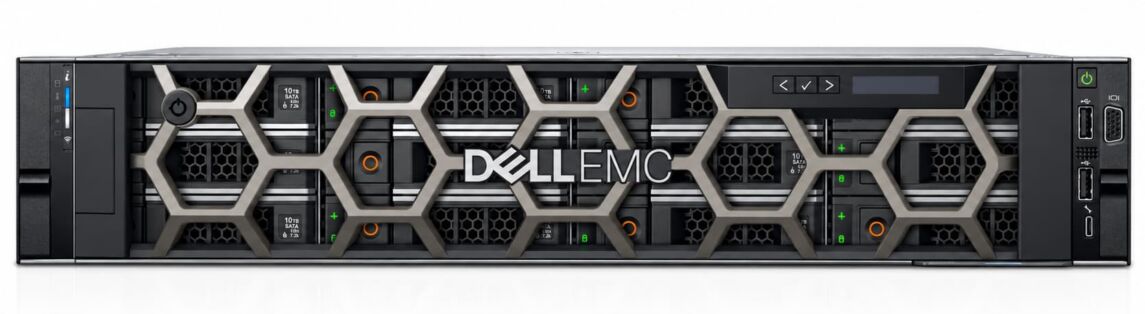
The Dell PowerEdge R540 is a two-rack-unit rack server from the 14th PowerEdge generation. It has two sockets for Intel Xeon Scalable processors and takes up to 14 drives in the 3.5-inch format. That is why it sits in many data centres as a storage node, backup target or virtualisation host. Dell ended sales in January 2023. Manufacturer support runs out at the end of March 2027, in other words in a few months’ time.
On this page you will find the lifecycle data of the R540, the sister models of the 14th generation for comparison, and guidance on how to keep running the server after the EOSL.
EOL and EOSL dates of the Dell PowerEdge R540
| Model name | Model number | Official EOL | Official EOSL | Extended support from Hardwarewartung.com |
| Dell PowerEdge R540 | E46S (type E46S001) | Jan 20, 2023 | Mar 31, 2027 | 7 to 10 years after EOL |
Table: EOL and EOSL of the Dell PowerEdge R540
We Maintain Your Dell PowerEdge R540 at the Best Price
Decades of experience have taught us what matters when maintaining your Dell PowerEdge R540. Benefit not only from our experience, but also from our excellent prices. Get a no-obligation quote and compare for yourself.
The EOL (end of life) marks the end of sales. From that date, Dell no longer ships new units; since then, R540 systems have been available only from remaining stock or as refurbished equipment. With the EOSL (end of service life) in March 2027, manufacturer support ends: Dell will then supply no more spare parts, provide no technical assistance and publish no new BIOS or firmware versions.
All chassis variants of the R540 run under the regulatory model E46S with the type E46S001, regardless of whether the server has eight or twelve drive bays at the front. That is what the regulatory documents on the Dell support site state.
Dell does not publish a fixed EOL or EOSL list for individual PowerEdge rack servers. A Dell moderator confirms in the Dell Community that there are no documented dates for this. Support usually runs for five to seven years, depending on the availability of the hardware. The data in the table comes from our EOL/EOSL overview for Dell PowerEdge. When support for your own unit ends depends on the service tag and on the contract you have taken out. How to check this is explained further down.
The EOL in January 2023 falls in the period when Dell was bringing the 15th generation to market. The direct successor to the R540 is the PowerEdge R550 (Technical Guide).
The R540 compared with other models of the 14th PowerEdge generation
The R540 shares its lifecycle data with the 1U model R640. The larger R740 and R840 systems remained on sale until the end of 2023. On the four-way R840 server, the EOSL already passed on 30 September 2026.
| Model name | Model number | Official EOL | Official EOSL | Extended support from Hardwarewartung.com |
| Dell PowerEdge R540 | E46S | Jan 20, 2023 | Mar 31, 2027 | 7 to 10 years after EOL |
| Dell PowerEdge R640 | E39S | Jan 20, 2023 | Mar 31, 2027 | 7 to 10 years after EOL |
| Dell PowerEdge R740 | E38S | Q4 2023 | Aug 31, 2028 | 7 to 10 years after EOL |
| Dell PowerEdge R840 | E49S | Q4 2023 | Sep 30, 2026 | 7 to 10 years after EOL |
| Dell PowerEdge R940 | E41S | Jun 30, 2023 | Feb 1, 2027 | 7 to 10 years after EOL |
Table: EOL and EOSL of the 14th Dell PowerEdge generation
For appliances based on these servers, Dell states dates of its own. The PowerFlex Appliance R640, for example, had its EOL on 7 August 2023 according to the Dell knowledge base on PowerFlex. The end of support (EOSL) is 31 August 2028. These dates apply only to the appliance and cannot be transferred to the individual server. You will find more on the R740 and R740xd on our page about the EOL and EOSL of the R740.
We Maintain Your Dell PowerEdge R540 at the Best Price
Decades of experience have taught us what matters when maintaining your Dell PowerEdge R540. Benefit not only from our experience, but also from our excellent prices. Get a no-obligation quote and compare for yourself.
Technical specifications of the R540
According to Dell’s data sheet, the R540 takes up to two Intel Xeon Scalable processors with up to 20 cores each. It shipped with first generation (Skylake-SP) and second generation (Cascade Lake-SP) CPUs. Sixteen DDR4 slots hold RDIMMs or LRDIMMs at up to 2,666 MT/s, for a maximum of 1 TB of memory.
Its strength is the room for drives. Up to twelve 3.5-inch SAS or SATA hard disks fit at the front, with two more at the back. The operating system can sit on a dedicated boot card (BOSS) with two mirrored M.2 SSDs, leaving the front bays free for data. The server is managed through iDRAC9 with Lifecycle Controller.
Checking the end of support for your own server
Dell identifies each server by its seven-character service tag. You can find it in the following ways:
- On the chassis: on the pull-out information label at the front and on a sticker at the back.
- In the iDRAC: the web interface shows the service tag directly in the dashboard.
- In the operating system: under Linux with “dmidecode -s system-serial-number”, under Windows via PowerShell with “Get-CimInstance Win32_BIOS” (the SerialNumber field).
Enter the service tag on the Dell support site and open the “Service Events” tab. Switch off the “Show active events only” filter there. The page will then show the end-of-service-life date of your unit.
What falls away after 31 March 2027
The R540 keeps running after the EOSL. New BIOS versions, iDRAC firmware and CPU microcode will no longer be supplied by Dell, however. Two examples from recent years show how often such updates are needed. With DSA-2023-098, Dell closed a vulnerability in the system management mode of the BIOS (CVE-2023-25537, CVSS 6.1), on the R540 from BIOS 2.18.1 onwards. DSA-2025-046 affects the BIOS and iDRAC9 (CVE-2025-26482, CVSS 4.9) and is fixed on the R540 from BIOS 2.23.0 onwards.
Vulnerabilities that come to light after the EOSL remain open on the R540. For that reason, install the latest available versions for the BIOS, iDRAC, RAID controller and network cards before March 2027. Dell recommends a fixed order for this:
- the iDRAC first
- then the BIOS
- after that the CPLD or FPGA
- and finally the remaining components.
Servers that have not been updated for a long time are best brought up in stages via intermediate versions.
After the EOSL, the iDRAC belongs in an isolated management VLAN. As a VPN endpoint or as a system with direct exposure to the internet, an R540 is unsuitable from 2027 onwards.
We Maintain Your Dell PowerEdge R540 at the Best Price
Decades of experience have taught us what matters when maintaining your Dell PowerEdge R540. Benefit not only from our experience, but also from our excellent prices. Get a no-obligation quote and compare for yourself.
VMware: ESXi 8 and VCF 9 on the R540
Dell lists the R540 among the PowerEdge servers certified for VMware vSphere 8.0. In the same article, Dell advises against booting ESXi 8.0 from SD cards or USB sticks. Anyone still booting from the internal dual SD module (IDSDM) should move to BOSS or an SSD before upgrading.
For VMware Cloud Foundation 9, the picture is tighter. According to the Broadcom knowledge base, Skylake-SP processors only run in “deprecated mode” in VCF 9.x, as of 18 September 2026. Broadcom does not intend to extend support beyond VCF 9.x. Cascade Lake-SP also runs in deprecated mode in VCF 9. Broadcom has announced that it will remove such systems with the next major release. For an R540, ESXi 8 or VCF 9 is therefore the last stop.
Continued operation with third party maintenance
With proper air conditioning, the hardware of the R540 usually lasts considerably longer than Dell support. Hardwarewartung.com takes over maintenance for the R540 for seven to ten years after the EOL. On paper, that reaches into the years 2030 to 2033.
We keep Dell spare parts in our own warehouses around the clock. Technicians are on site within two hours, and repair is guaranteed within four hours. Compared with Dell ProSupport, up to 50 percent of the cost can be saved.
Third party maintenance covers possible hardware defects. New firmware can be supplied by a third party provider only in certain cases. For that reason, plan the R540 after the EOSL for tasks where missing security updates matter little: as a backup repository, as archive storage, in test and development environments, or for internal services behind a firewall.
We Maintain Your Dell PowerEdge R540 at the Best Price
Decades of experience have taught us what matters when maintaining your Dell PowerEdge R540. Benefit not only from our experience, but also from our excellent prices. Get a no-obligation quote and compare for yourself.
Dell PowerEdge ProSupport: all the benefits at a glance
Dell EMC partner for the whole of Europe
As a Dell EMC partner with a strong specialisation in the Dell PowerEdge server market, we can offer maintenance packages on considerably better terms than traditional system integrators or your Dell channel partner. With more than 300 experts at over 40 service locations in Germany, Austria and Switzerland alone, we deliver our service right across Europe.