


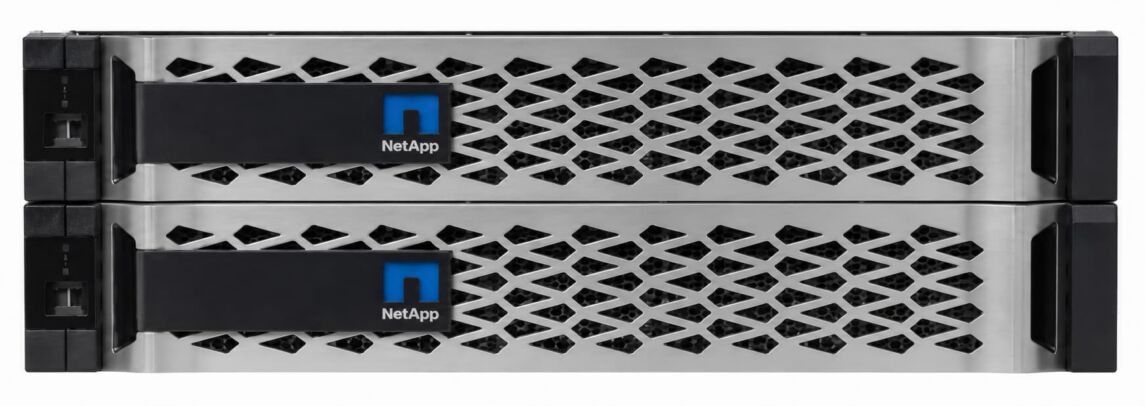
NetApp AFF C190: EOL, EOSL and Your Options Afterwards
Manufacturer support for the NetApp AFF C190 ends on 30 November 2028. That marks the EOSL. From 1 December 2028 onwards, NetApp will no longer supply spare parts for the platform, will not accept support cases and will not provide any further firmware updates. The system has not been sold as new equipment since 2022.
For IT managers, the question therefore arises now: migrate, or hand maintenance over to a third party provider? Both paths have clear use cases, and both belong in the budget planning for 2027 and 2028.
Key facts at a glance
- The EOSL of the NetApp AFF C190 is 30 November 2028. After that, RMA, TAC access and firmware updates all fall away.
- The minimum operating system version is ONTAP 9.6; the hardware is approved up to ONTAP 9.16.1. Software support runs longer than hardware support.
- The main risks in continued operation are NetApp-coded SSDs with 520-byte sectors, the ageing NVRAM battery, and a boot media recovery that only works manually via the LOADER prompt.
- If the system carries tier 1 data, migration has to happen before the deadline. If it runs as a backup target, file server or test storage, third party maintenance is usually the cheaper choice.
Product lifecycle of the NetApp AFF C190
| Milestone | Meaning | Date, AFF C190 |
| Release (GA) | Market launch | January 2019 |
| End of Availability (EOA) | End of new sales | Approx. August 2022 |
| End of Service Life (EOSL) | End of hardware support, RMA, and TAC | November 30, 2028 |
Table: Product lifecycle of the NetApp AFF C190
The EOA dates vary by assembly, for example for IOM12 modules or individual supplier parts. On the EOSL, by contrast, the service databases agree: it is 30 November 2028. For comparison, manufacturer support for the closely related AFF A220 and AFF A300 models already runs out on 30 November 2026. The C190 therefore has two more years of breathing room.
Your NetApp Support Specialist
NetApp support and maintenance for all systems – including EOL and EOSL models for which no SupportEdge extension is available any more.
What separates EOL from EOSL on the AFF C190
EOL and EOA mark the end of sales. From that point on you can no longer order new controllers from the manufacturer, but operation carries on unchanged. Support and spare parts still come from NetApp.
When the EOSL is reached on 30 November 2028, various manufacturer commitments fall away: spare parts within the agreed response time, tickets with the Technical Assistance Center, or a patch when a new security vulnerability appears.
What falls away with the EOSL on 30 November 2028
Three services that safeguard operation disappear once the EOSL is reached:
First, access to the Technical Assistance Center and the RMA process. For kernel panics, split-brain situations in the cluster or unexplained latency spikes, NetApp no longer provides tier 3 engineers, and NetApp no longer keeps coded SSDs, controller boards, I/O modules, power supplies or NVRAM batteries in its service depots. The RMA process (Return Material Authorization) therefore no longer applies.
Second, the evaluation of telemetry. AutoSupport sends diagnostic data, performance metrics and event logs to NetApp, where Active IQ derives configuration errors and imminent hardware defects from them. A gradually degrading SSD triggers an RMA this way before it fails. Without a service contract, NetApp no longer processes this data. From then on, your team takes over monitoring, trend analysis and capacity planning.
Third, firmware and microcode. The BMC, Service Processor, BIOS/UEFI and above all the SSD firmware no longer receive updates. New CVEs at this level remain open. In regulated environments, for example among operators of critical infrastructure, in finance or in healthcare, this quickly becomes an audit finding under ISO 27001 or the BSI baseline protection standard.
ONTAP: software support runs longer than hardware support
At NetApp, the hardware and software lifecycles diverge considerably. The C190 came to market together with ONTAP 9.6, which is the minimum version. A downgrade to 9.5 or older fails because the drivers for this platform are missing from older kernels.
At the upper end, the platform is surprisingly long-lived: it is approved up to ONTAP 9.16.1. That means hardware from 2019 can still run newer functions such as extended qtree performance monitoring, the S3 CORS configuration for browser-based applications and TLS for NVMe over TCP. The support windows for individual releases can be found in NetApp’s version support overview.
One point you should bear in mind, because it can affect costs: the C190 shipped with the Flash Bundle, which includes SnapMirror, SnapVault, SnapRestore, SnapCenter and FlexClone. Newer functions such as Autonomous Ransomware Protection, by contrast, sit in the ONTAP One license. Anyone wanting to use them on the old hardware pays for a license upgrade that rarely pays off on a system of this size.
Practical recommendation: bring ONTAP up to a stable, mature patch level while the manufacturer contract is still running. A frozen, hardened release is the best starting point for any continued operation after 2028.
Your NetApp Support Specialist
NetApp support and maintenance for all systems – including EOL and EOSL models for which no SupportEdge extension is available any more.
Technical specifications of the AFF C190
| Feature | Specification (HA pair) |
| Form factor | 2U, two controllers in active-active operation |
| CPU | 2 x 8-core, 1.50 GHz (one per controller) |
| Memory | 64 GB (32 GB per controller) |
| NVRAM (write cache) | 8 GB (4 GB per controller) |
| Drives | 8, 12, 18, or 24 SSDs with 960 GB, fixed configuration |
| Capacity | Approx. 23 TB raw, up to 50.5 TB effective at 3:1 data reduction |
| Networking | 4 x UTA2 (16 Gb FC or 10GbE) or 4 x 10GBASE-T per system |
| Cluster interconnect | 4 x 10GbE SFP+ |
| Expansion | No PCIe slots, no external disk shelves |
| Performance | Up to 4.4 GB/s sequential read, up to 230,000 IOPS at sub-millisecond latency |
| Cluster scaling | Up to 24 nodes for NAS, up to 12 nodes for SAN |
Table: Technical specifications of the AFF C190. Source: NetApp’s design guidelines for the C190.
If capacity runs short, FabricPool automatically moves cold data blocks to S3-compatible object storage, for example StorageGRID or a public cloud. The metadata stays on the system, and users notice nothing.
Risks of continued operation without a maintenance contract
Spare parts: 520-byte sectors and no spare drive
A defective SSD cannot be replaced with an off-the-shelf 960 GB drive. NetApp formats its drives with 520 bytes per sector instead of the usual 512 bytes. WAFL uses the eight extra bytes for checksums and integrity data. ONTAP marks an uncertified SSD as “Unsupported” and refuses to add it to an aggregate.
There is a further complication: the C190 is configured at the factory without a hot spare, so that every SSD can be used for payload data. On larger systems NetApp requires at least one replacement drive; not here. If a drive fails, RAID-DP or RAID-TEC maintains redundancy until you physically replace it. Without a guaranteed spare parts supply, that window stretches from hours to days.
The NVRAM battery
Writes land in the NVRAM first and are acknowledged to the host immediately. Only afterwards does WAFL write them to the SSDs in batches. This is where the sub-millisecond latencies come from. In the event of a power failure, a lithium-ion buffer battery saves the cache contents to an internal flash module.
This battery ages chemically, typically after three to five years of continuous operation. If it drops below a critical health value, ONTAP switches off the write cache and changes to write-through mode. Every write command then goes synchronously to the SSDs. Latency rises from under 1 ms to 10 to 50 ms, and databases and VDI sessions run into timeouts. An original battery that ONTAP recognises without errors is hard to obtain without a maintenance contract.
Boot media and encryption keys
ONTAP sits on an internal boot medium directly on the mainboard, not on the 24 front SSDs. Because of logs and core dumps, this module has a finite service life and is among the more common causes of failure. Newer A series systems then restore themselves automatically over the network. For the C190, NetApp prescribes a manual boot media recovery.
That route runs via a console cable and the LOADER prompt. It gets delicate when the system works with NetApp Volume Encryption or Storage Encryption through the Onboard Key Manager: the master keys sit on exactly the medium that failed. The administrator has to restore the key manager, know the original passphrase and enter a page-long base64 key block character by character over the console. A typo or a missing OKM backup means the data on the SSDs stays encrypted. For good.
Firmware, CVEs and compliance
Without firmware updates, the hardware’s security posture freezes at the 2028 level. Anyone continuing to operate the system after that should segment it at network level, take the management interfaces out of the production network and document the situation in the risk analysis. Auditors are considerably more willing to accept a legacy system when compensating controls are documented.
MetroCluster and geo-redundancy
One point that is often noticed too late during planning: the C190 supports MetroCluster neither over IP nor over Fibre Channel. Models such as the A220 or the FAS2750 can do this under ONTAP 9.6; the C190 expressly cannot. That makes the platform unsuitable for synchronous mirroring across two sites with an RPO of 0. What is intended instead is asynchronous replication via SnapMirror and SnapVault. Anyone tightening their geo-redundancy requirements will need new hardware in any case.
Three options after the EOSL of the NetApp AFF C190
Migration to a successor system
For business-critical workloads, ERP databases, production vSphere clusters or the primary file server, a hardware refresh is the clean path. NetApp designates the AFF A150, A250 and C250 as successors, along with the current generation A20, A30, A50, C30 and C60.
The changeover runs during live operation via Aggregate Relocation (ARL). In the process, ONTAP moves logical control over the aggregates and the data LIFs step by step between the old and the new controller, driven by “system controller replace”. The procedure comprises six stages:
- Check system health and the key manager, and pause SnapMirror
- Evacuate and remove node 1
- Install node 3 and assign the drives
- Evacuate node 2
- Install node 4
- Finally, verify encryption and restart replication.
LUNs and shares stay online throughout. Allow time for the preparation, particularly for the OKM keys.
Extending NetApp support
The manufacturer contract can be extended up to the EOSL, but not beyond. This option buys time until November 2028. Prices for post-warranty contracts rise noticeably in the last few years before the EOSL, which is why it is worth comparing them with a third party maintenance quote beforehand.
Third party maintenance
For systems that move into a secondary role after a modernisation, maintenance by a specialist third party provider such as Hardwarewartung.com is the most economical solution. Typical scenarios are the local backup target, the SnapVault target for long-term archiving, the file server for unstructured data, or test and development environments.
A specialist provider takes over the physical SLAs that NetApp previously delivered:
- its own spare parts warehouses with coded 960 GB SSDs
- controller boards and NVRAM batteries
- a hotline around the clock
- response times of four hours, and
- guaranteed on-site repair.
Costs are typically 40 to 50 percent below the manufacturer’s post-warranty prices, and the term can be extended by seven to ten years beyond the EOSL.
There is one limitation: legally, a third party provider may not supply firmware updates, microcode or new ONTAP patches, because the rights to them belong to NetApp. Third party maintenance therefore suits systems whose software level is stable and which run isolated at network level.
Your NetApp Support Specialist
NetApp support and maintenance for all systems – including EOL and EOSL models for which no SupportEdge extension is available any more.
Alternatives after the EOSL of the NetApp AFF C190: the overview
| Criterion | Favors migration | Favors third-party maintenance |
| Data criticality | Tier 1, ERP, production databases | Tier 2/3, backup, archive, test and development |
| Capacity | All 24 bays exhausted, growth foreseeable | Utilization stable, FabricPool absorbs peaks |
| Performance | IOPS or latency limits are being reached | Load profile unchanged for years |
| Geo-redundancy | MetroCluster or RPO 0 required | Asynchronous SnapMirror is sufficient |
| Feature requirements | ONTAP One, ransomware protection, new protocols | ONTAP 9.16.1 covers everything |
| Compliance | Firmware patches are an audit requirement | Segmented network, documented risk analysis |
| Budget | CAPEX planned for 2027/2028 | CAPEX to be deferred, OPEX preferred |
Table: Alternatives after the EOSL of the NetApp AFF C190
FAQs: common questions about the EOL and EOSL of the NetApp AFF C190
Does the AFF C190 keep working after the EOSL on 30 November 2028?
Yes. The hardware runs unchanged, ONTAP starts up, and the data stays available. What ends is spare parts supply, TAC access and firmware updates from NetApp.
Can I expand capacity with external disk shelves?
No. The C190 is designed as a fixed-format system. There are four MiniSAS HD ports on the back, but on this controller model ONTAP blocks the attachment of additional shelves. The limit is fixed at 24 internal SSDs. The only way to create additional space is FabricPool, which offloads cold data to object storage.
Can I fit an off-the-shelf SSD as a replacement?
No. The drives carry NetApp firmware and use 520-byte sectors. ONTAP identifies third-party drives as unsupported and will not add them to an aggregate. You remain dependent on coded original drives, even after the EOSL.
Is the C190 suitable as a backup target for Veeam?
Yes. Alongside iSCSI, FC, NFS and SMB, ONTAP comes with an S3 server of its own, and the C190 is certified as a Veeam Ready Repository for capacity targets. The recommendations are jumbo frames with MTU 9000, active deduplication and compression, and at least ONTAP 9.12.1P18. Object immutability on ONTAP S3 has not so far been consistently validated in this context, so for immutable backups you should look at a separate route.
What happens if the RTC battery fails?
Alongside the NVRAM battery, a conventional coin cell for the real-time clock sits on the mainboard. If it fails, the controller loses the system time after a restart. The consequences range from broken SnapMirror relationships to failing Kerberos authentication against Active Directory, because time synchronisation is missing. This battery is a replaceable FRU as well.
How long can the system be operated with third party maintenance?
As long as the hardware runs stably and spare parts are available, seven to ten years beyond the EOSL is realistic. For the C190, that horizon reaches into the late 2030s. What matters is a provider with its own stock of coded SSDs and NVRAM batteries.
Closing recommendations
Decide as early as 2027 what role the AFF C190 is to play after 2028. If it still carries production databases, virtual machines or the central file server, plan the migration to a successor system and carry it out via ARL during live operation.
If your modernisation demotes the system to a backup target, archive or test storage, a hardware refresh is hard to justify economically. In that case a third party maintenance contract secures operation at a fraction of the manufacturer’s cost.
In both cases the same applies: bring ONTAP up to a stable patch level before the manufacturer contract expires, back up the OKM keys and check the condition of the NVRAM batteries. These three steps cost little and determine how quietly the years after the EOSL pass.
Our NetApp support: all the benefits at a glance
NetApp partner for the whole of Europe
As a NetApp support partner, we can offer maintenance packages on considerably better terms than traditional system integrators. With more than 300 experts at over 40 service locations in Germany, Austria and Switzerland alone, we deliver our service right across Europe.
At your service around the clock
Your NetApp Support Specialist
NetApp support and maintenance for all systems – including EOL and EOSL models for which no SupportEdge extension is available any more.